 Sketchnote titled 'Agentic AI Is an Architecture, Not a Chatbot.' It shows three panels from left to right. Panel 1 shows a basic chatbot that mostly answers questions. Panel 2 shows an agentic AI system with three core components — Model, Instructions, and Tools — coordinated by an Agent / Orchestrator, with supporting capabilities such as retrieving data, using APIs, and taking example actions. Panel 3 shows a governed agentic system surrounded by controls for identity and access, approved tools and APIs, grounding data from organizational sources and memory, content safety and policy, monitoring and logs, cost controls and quotas, human approval gates, and an owner/support model. Bottom callouts emphasize that agentic AI is not one product, the model is only one part, tools need permissions, data needs governance, actions may need approval, logs show what happened, budgets alert while controls limit, and someone owns it. Additional notes say not every use case needs an agent, explain when to consider an agent, and conclude: 'Build it like an application. Run it like a service. Govern it like it matters.' A small footer says: 'Based on Microsoft Learn documentation • Last verified: June 25, 2026.'
Agentic AI is an Architecture, Not a Chatbot
The big picture: how models, agents, tools, data, and governance fit together into a system.
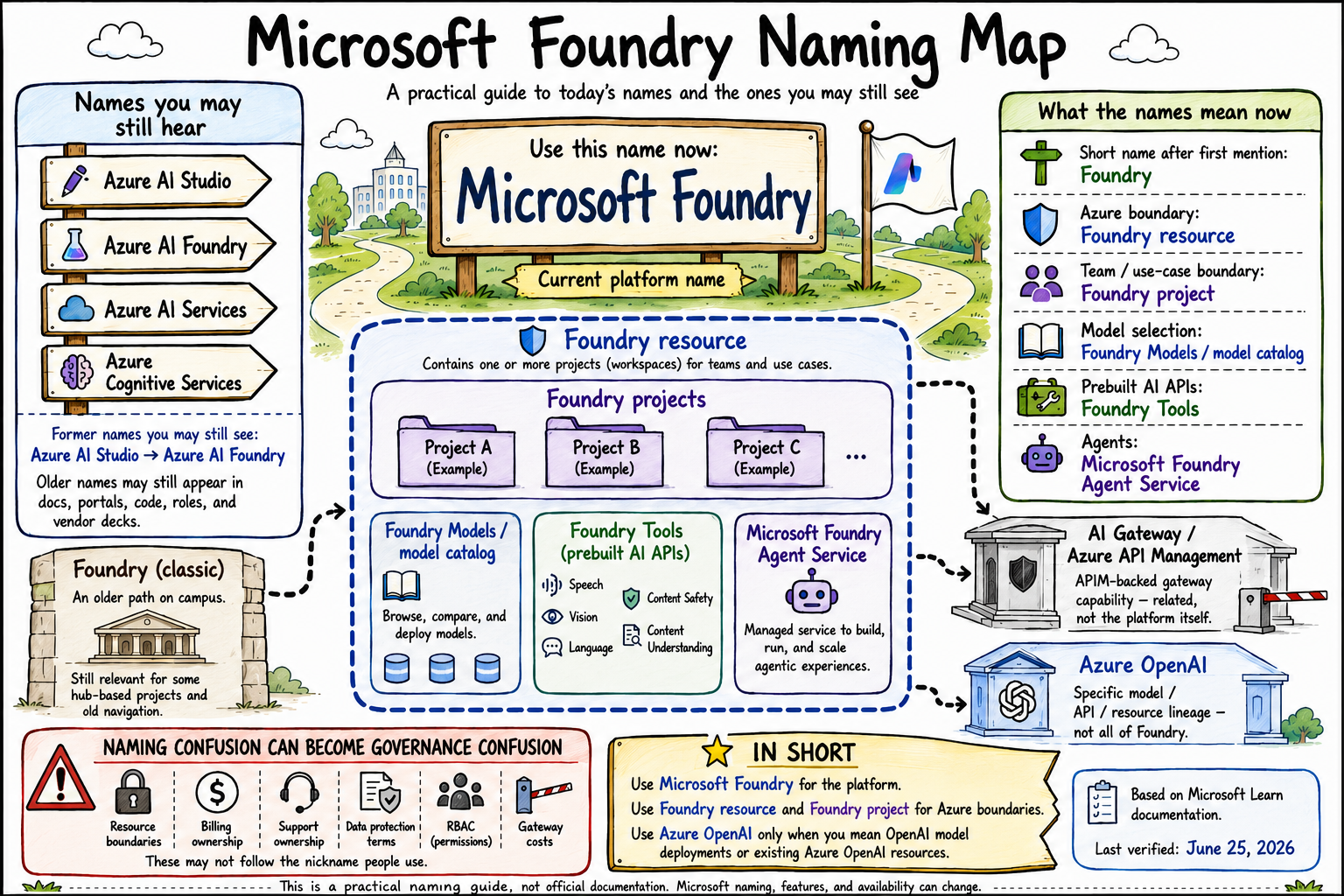 A sketchnote styled as a campus wayfinding map. The central sign says Microsoft Foundry, marked as the current platform name. Smaller signs show former names Azure AI Studio and Azure AI Foundry. A large Foundry resource boundary contains Foundry projects, Foundry Models/model catalog, Foundry Tools, and Microsoft Foundry Agent Service. Azure OpenAI and AI Gateway/Azure API Management are shown as related but distinct areas. A caution panel warns that naming confusion can lead to governance, billing, support, data protection, RBAC, and gateway cost confusion.
Foundry Naming Map
Microsoft's AI platform has had three names. This map explains what's current, what's legacy, and what actually lives where.
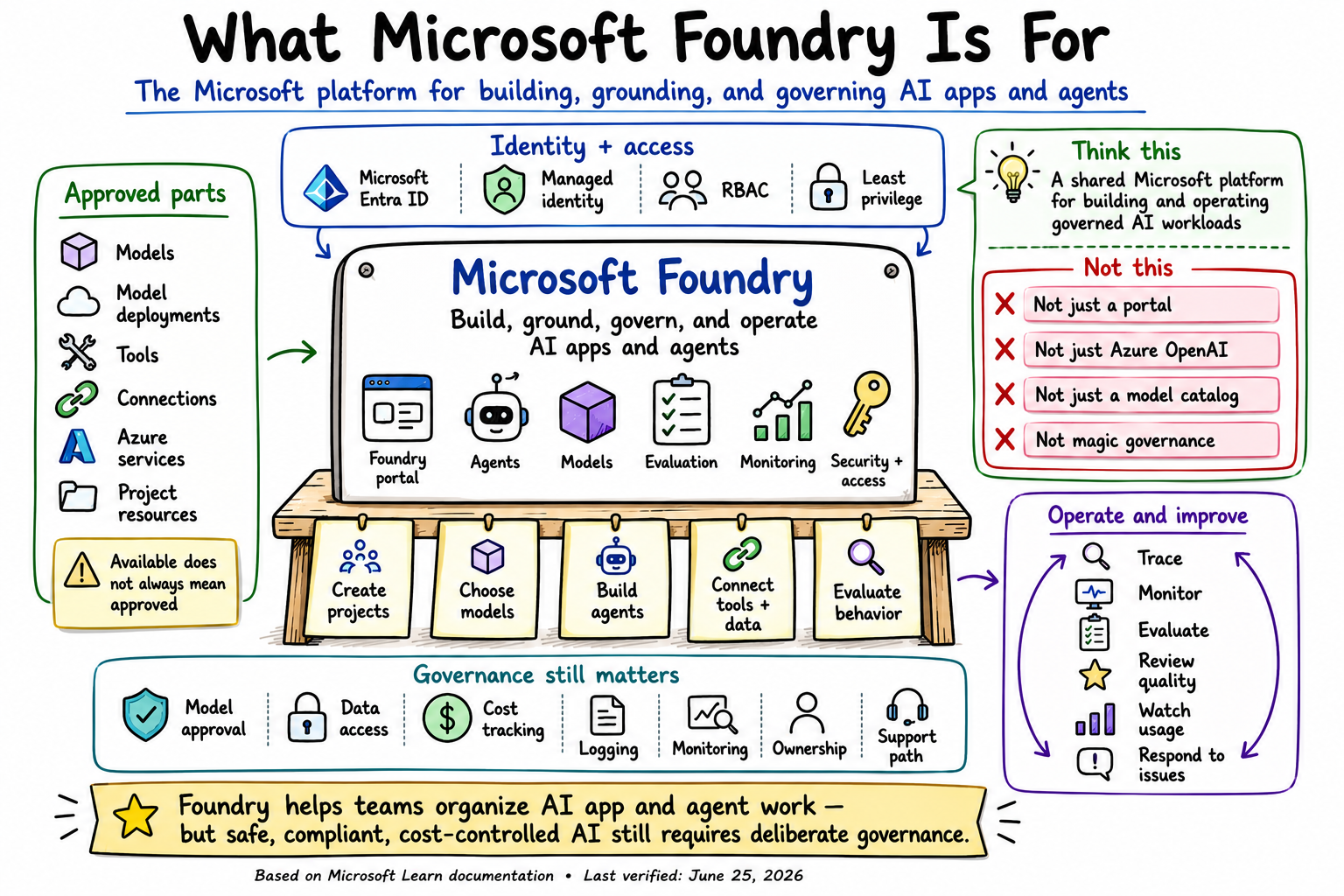 Sketchnote titled "What Microsoft Foundry Is For." The subtitle describes Foundry as "The Microsoft platform for building, grounding, and governing AI apps and agents." A central Microsoft Foundry workbench says "Build, ground, govern, and operate AI apps and agents" and shows labeled icons for Foundry portal, agents, models, evaluation, monitoring, and security plus access. On the left, an "Approved parts" panel lists models, model deployments, tools, connections, Azure services, and project resources, with a caution that available does not always mean approved. Across the top, an "Identity + access" rail highlights Microsoft Entra ID, managed identity, RBAC, least privilege, and the warning that access still needs design. In the upper right, a "Think this / Not this" section explains that Foundry should be understood as a shared Microsoft platform for building and operating governed AI workloads, not just a portal, not just Azure OpenAI, not just a model catalog, and not magic governance. The bottom governance rail lists model approval, data access, cost tracking, logging, monitoring, ownership, and support path. A lower-right operations loop lists trace, monitor, evaluate, review quality, watch usage, and respond to issues. The bottom banner states that Foundry helps teams organize AI app and agent work, but safe, compliant, cost-controlled AI still requires deliberate governance. Footer text reads: "Based on Microsoft Learn documentation • Last verified: June 25, 2026."
What Microsoft Foundry Is For
Foundry is the Microsoft platform for building, grounding, and governing AI apps and agents — not just a portal, not magic governance.
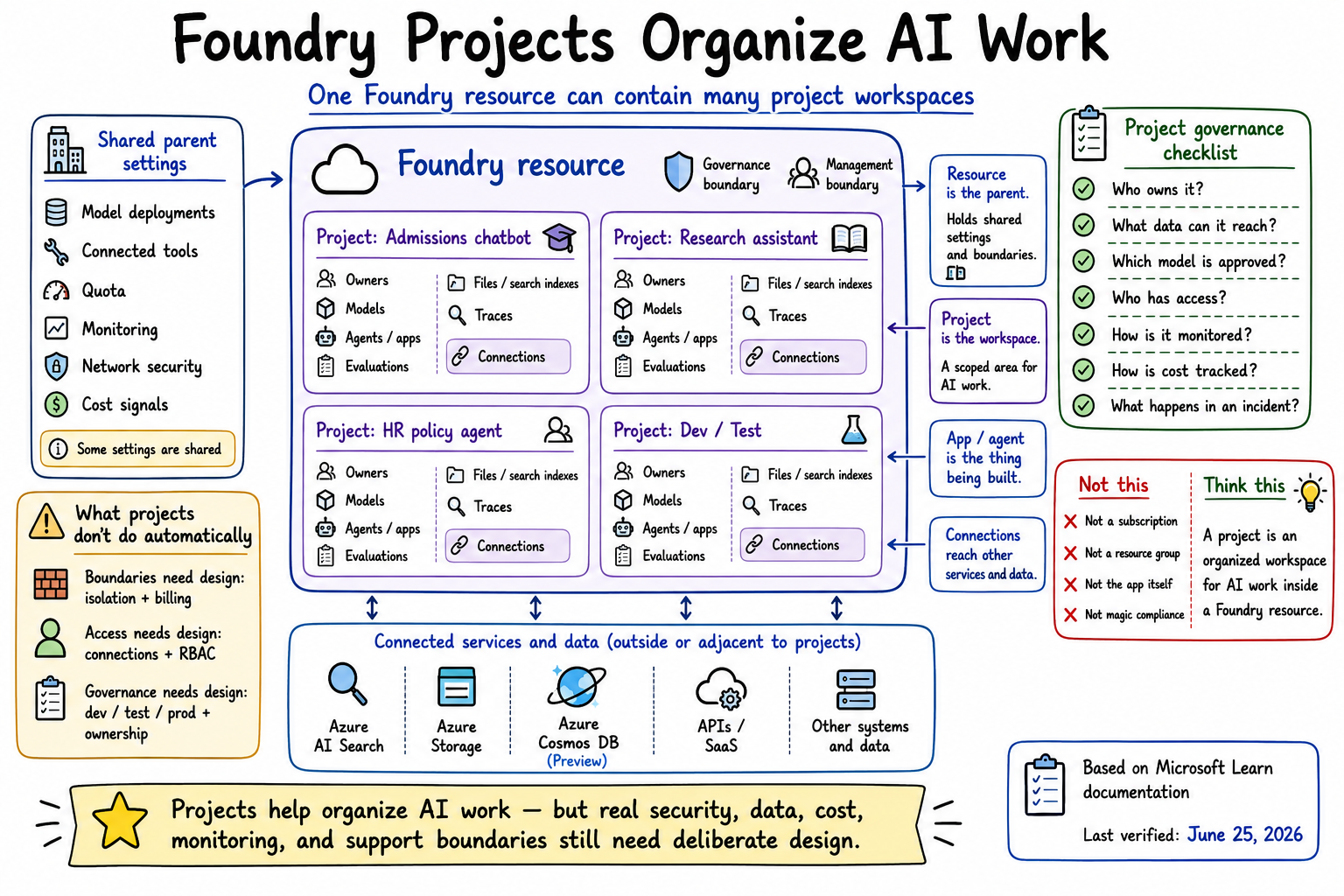 Sketchnote titled "Foundry Projects Organize AI Work." The subtitle says one Foundry resource can contain many project workspaces. In the center, a large Foundry resource box labeled "Parent Azure resource" contains four nested project workspaces: Admissions chatbot, Research assistant, HR policy agent, and Dev/Test. Each project lists owners, models, agents or apps, evaluations, files or search indexes, traces, and connections. A left panel labeled "Shared parent settings" lists model deployments, connected tools, quota, monitoring, network security, and cost signals, with a note that some settings are shared. A lower-left caution panel titled "What projects don't do automatically" explains that boundaries need design for isolation and billing, access needs design for connections and RBAC, and governance needs design for dev, test, prod, and ownership. A connected services panel below the projects shows Azure AI Search, Azure Storage, Azure Cosmos DB, APIs or SaaS, and other systems and data as external or adjacent resources. On the right, callouts explain that the resource is the parent, the project is the workspace, the app or agent is what is being built, and connections reach other services and data. A project governance checklist asks who owns it, what data it can reach, which model is approved, who has access, how it is monitored, how cost is tracked, and what happens in an incident. A "Not this / Think this" panel clarifies that a project is not a subscription, not a resource group, not the app itself, and not magic compliance; instead, it is an organized workspace for AI work inside a Foundry resource. The bottom banner says projects help organize AI work, but real security, data, cost, monitoring, and support boundaries still need deliberate design. A lower-right attribution card says the note is based on Microsoft Learn documentation and was last verified June 25, 2026.
Foundry Projects Organize AI Work
One Foundry resource, many project workspaces — but real isolation, access, and governance still need deliberate design.
 Sketchnote titled "The Model Catalog Is Not the Approved List." The image shows a left-to-right flow from model discovery to governed approval. On the left, a "Model Catalog" bookshelf contains three full-width provider-style rows labeled Azure OpenAI, Partner models, and Open/community models. Beneath them, four smaller square capability tiles show Embedding, Multimodal, Reasoning, and Small language models, indicating that these are different kinds of model categories or filters. Below the shelf are callouts reading "Find, compare, try, deploy" and "Catalog = available, not automatically approved." In the center, a "Review Gates" panel lists the checks needed before a model is approved: use case, data terms, security and privacy, cost and quota, region and availability, safety evaluation, support owner, and lifecycle or retirement. A large highlighted callout states "Available ≠ Approved." On the right, an "Approved Use List" clipboard lists what should be documented for approved use: model and version, approved use cases, allowed data, deployment type, cost owner, support owner, and re-review date. A nearby callout says "Approved for this use — not everything." Across the lower middle, a strip labeled "Model approval does not approve…" shows icons for agent, app, data sources, tools and APIs, prompts, users, monitoring, and production support, with a caution that model approval is only one layer of approval. At the bottom, an "In short" summary says the catalog shows what can be used, while governance decides what should be used for which data, users, cost, and risk. A footer notes that the sketchnote is based on Microsoft Learn documentation and was last verified on June 25, 2026.
The Model Catalog is Not the Approved List
Available does not mean approved. The catalog shows what can be used — governance decides what should be used, for which data, users, and risk.

From Answers to Actions
Agents don't just respond — they act. That shift from answering to doing is what makes governance, permissions, and oversight matter.

Azure API Management as the AI Gateway
APIM can front your AI traffic and enforce keys, quotas, and routing — but it isn't the whole governance story.
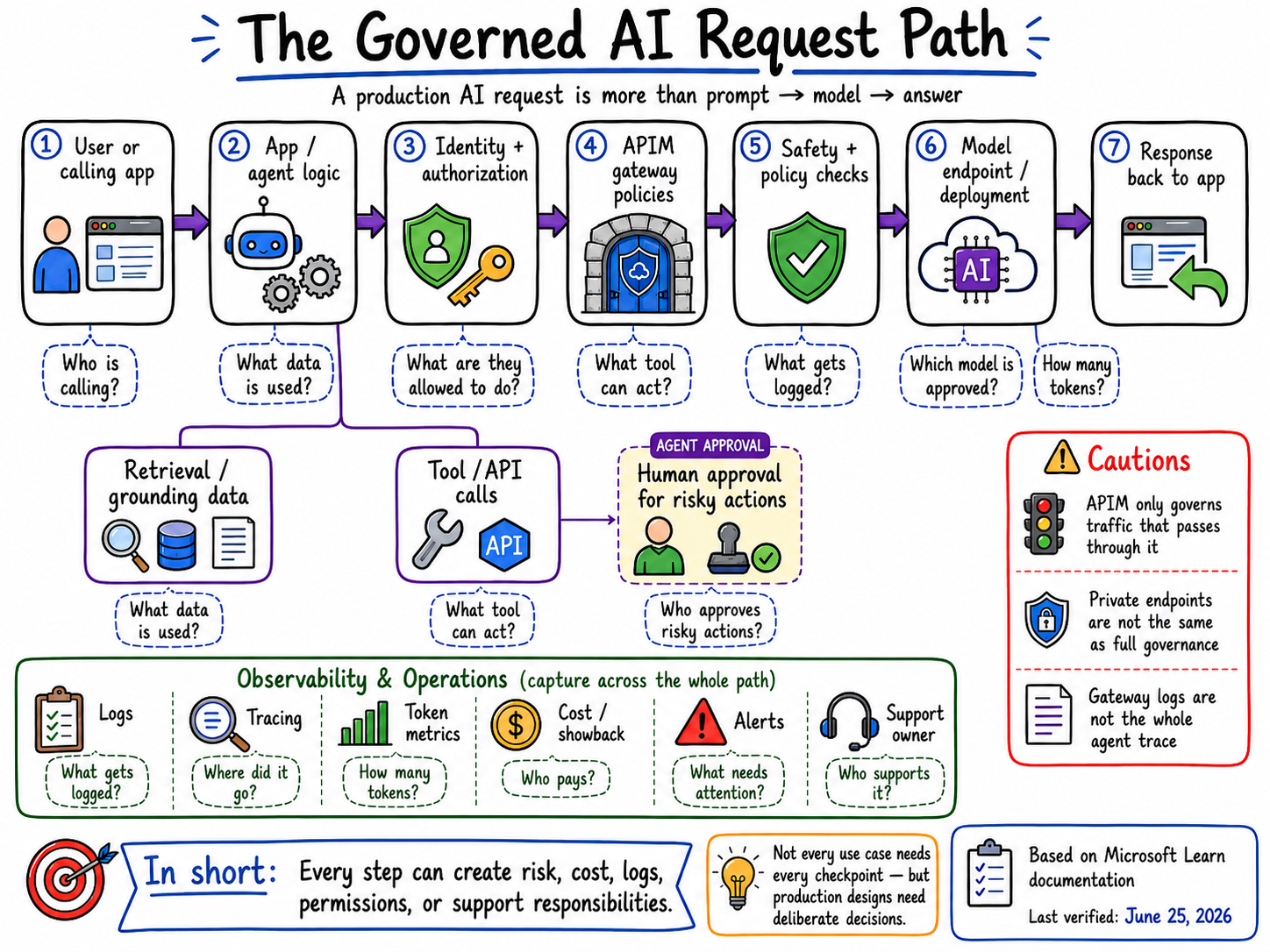
The Governed AI Request Path
A request isn't just prompt → model → answer — it's several steps, each with its own risk, logs, and approvals.
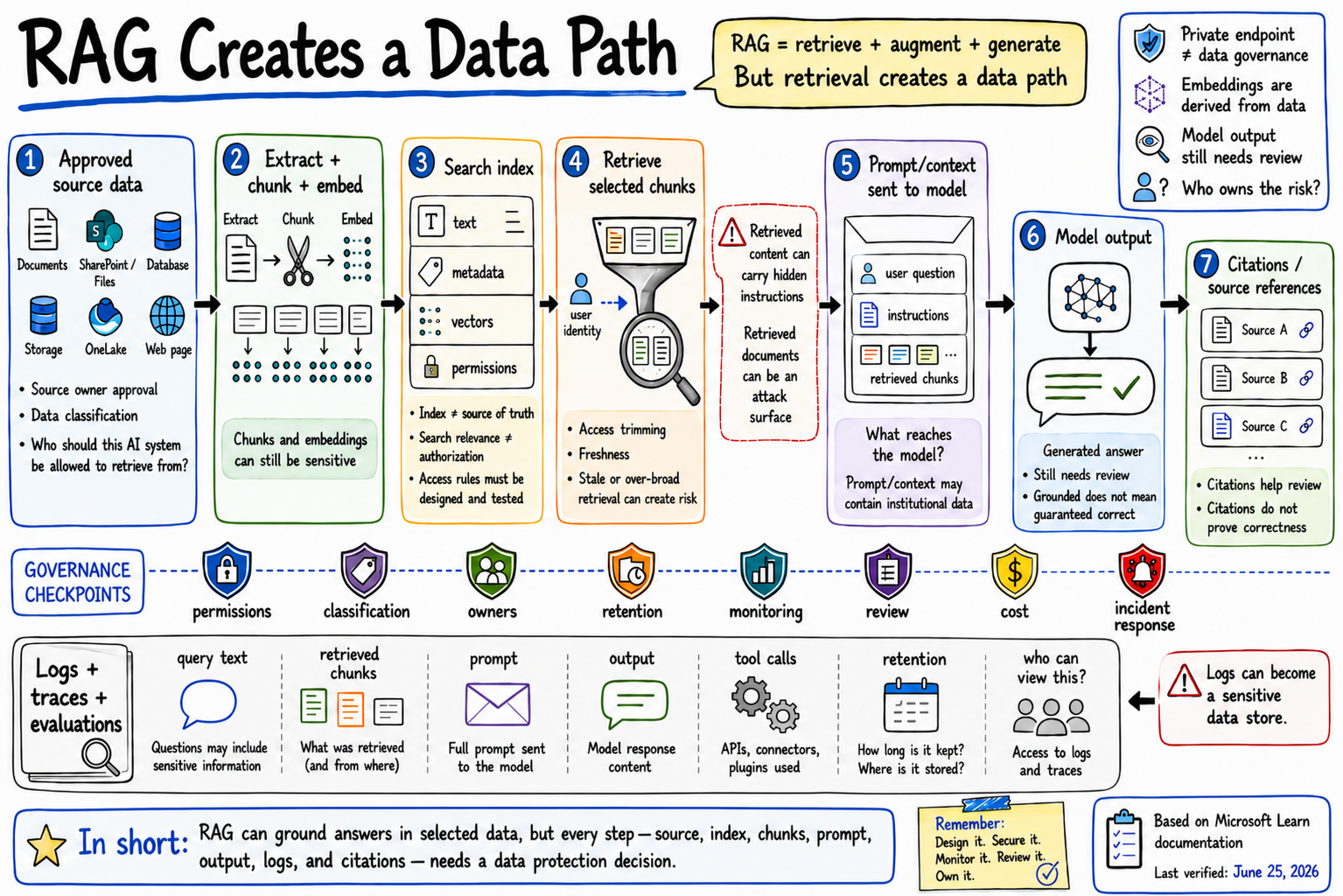
RAG Creates a Data Path
Retrieval isn't just search — it's a data path where source access, chunks, prompts, and citations all need their own protection.

AI Has More Than One Meter
The model bill is just one of many meters — gateway traffic, storage, and dev environments all quietly add their own.
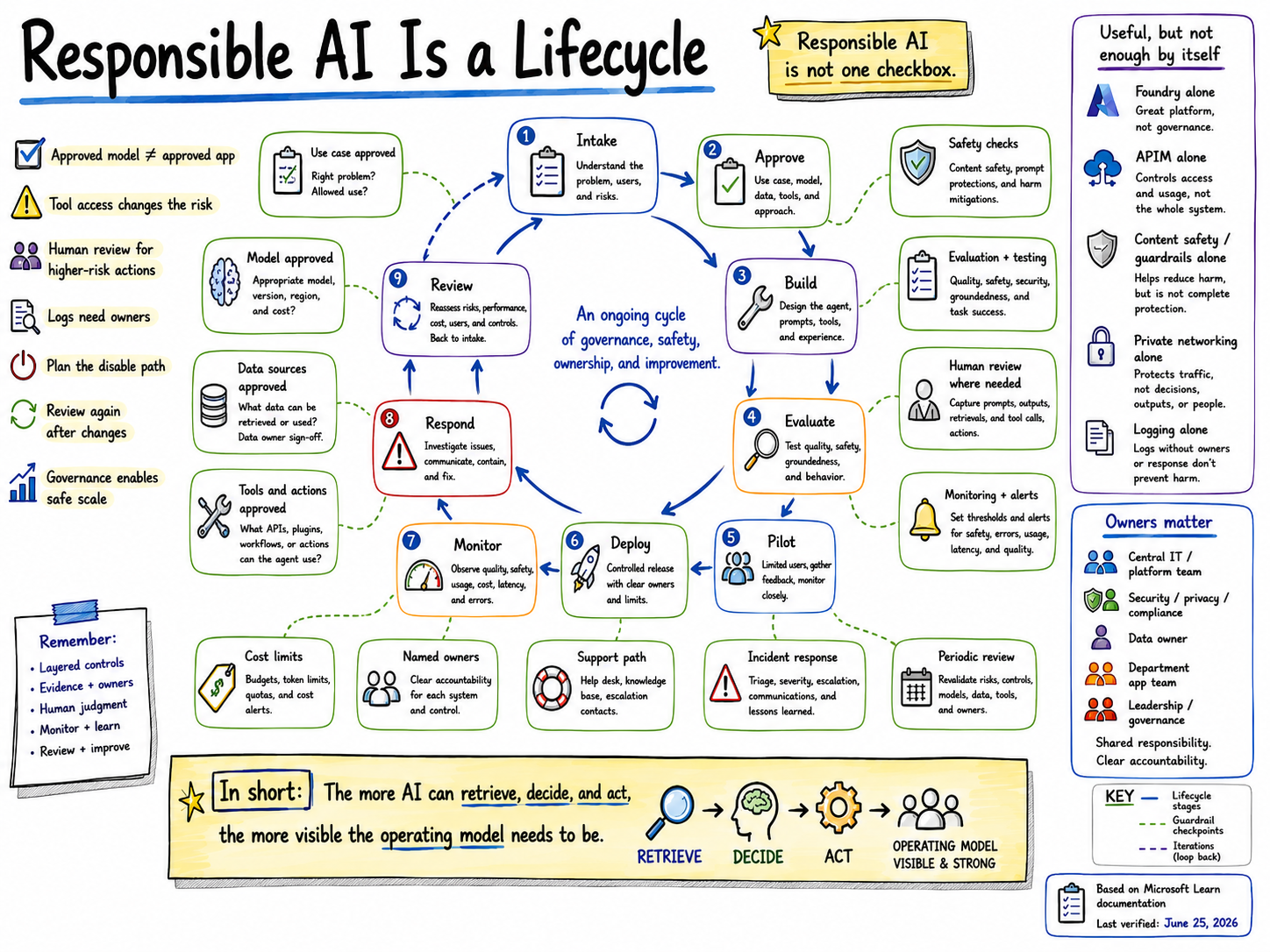
Responsible AI Is a Lifecycle
Responsible AI isn't a single checkbox - it's an ongoing cycle of governance, safety, ownership, and improvement.